How to Trade on the Spot Market?
TokenSpot enables users to trade crypto on the spot market using our Platform. The spot market is a public financial market where digital assets are traded with immediate delivery. Spot trading is a process where the Seller trades a digital asset (crypto) for another digital asset (fiat or otherwise) paid by the Buyer.
Users who buy or sell crypto at market rate are called Takers. Users who place limit orders to buy or sell crypto are Makers. Whenever an order is filled (whether it’s a Market order or a Limit order), the platform charges a fee. Transaction fees may vary for Makers and Takers (See Platform Fees).
To check your account status, go to your Profile page. You will see the Status box on the left, displaying your current status and your trade volume in crypto/fiat pairs over the last 30 days.
Please read our Spot Trading Rules before trading.
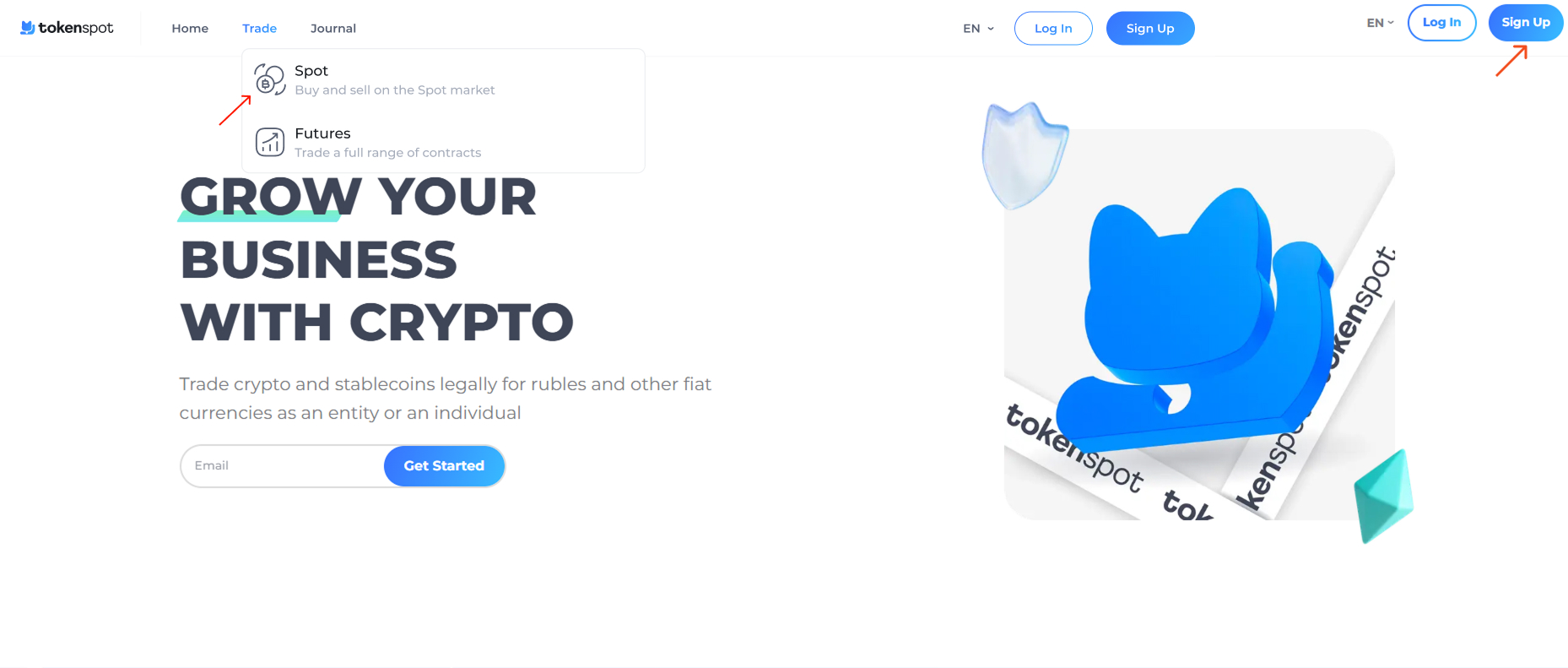
Log into your account and go to Trade – Spot.
You can use this page to trade on the spot market in crypto/fiat or crypto/crypto pairs and to view crypto prices and charts.
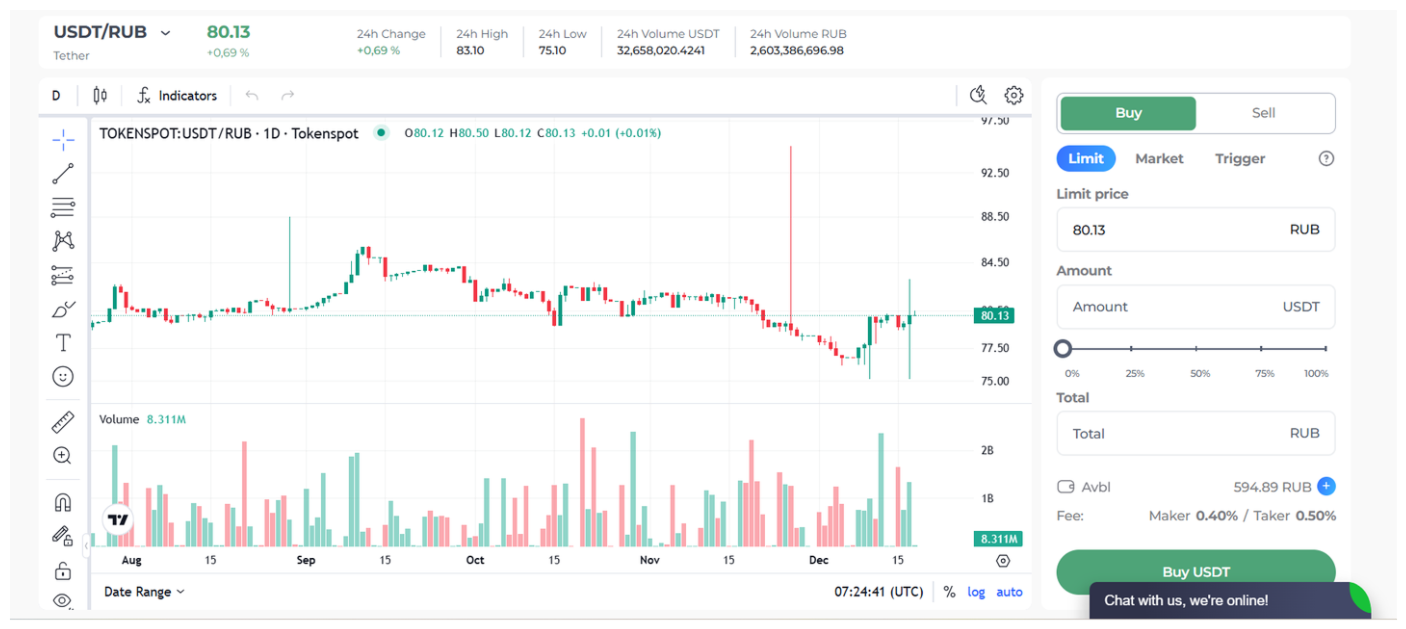
You can buy and sell crypto using two types of orders:
-
- Market order: You only have to specify the amount of crypto you’d like to buy or sell. Your order will be filled instantly at the best available market price.
- Limit order: You have to specify the price at which you wish to buy or sell crypto. Once you place your order, it will appear on the relevant order book. Your order will be filled when another user sells or buys crypto at a market price that effectively matches your specified price. A limit order may be filled partially in case it exceeds the amount of the matching market order.
- Trigger order: You create a resting order to buy or sell crypto. Once you post it, it appears in the resting order book. As soon as the coin’s market price matches your trigger price, a relevant order will be launched in accordance with your settings (Market Order/Limit Order).
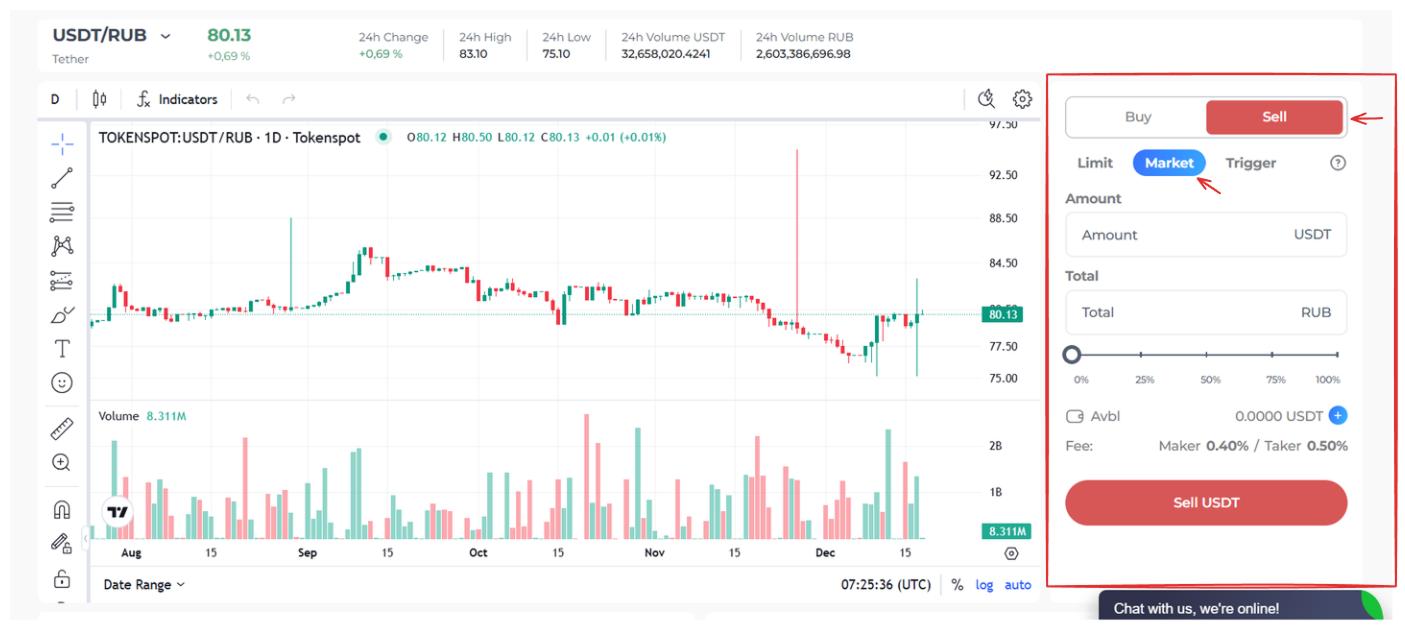
Scenario 1 (Market Order)
Imagine you would like to sell USDT for rubles instantly at market price. Select USDT/RUB from the Pair menu, then set the order form located in the right-hand sidebar to Sell → Market. Indicate the amount you would like to sell, either by entering the USDT amount in the Amount box, or by entering the RUB amount you would like to receive in the Total box. You can either type in the necessary amount, or set it as a percentage of your available coins by moving the percentage slider located below the Total box. Check your trade settings, then press ‘Sell USDT.’
Scenario 2 (Limit Order)
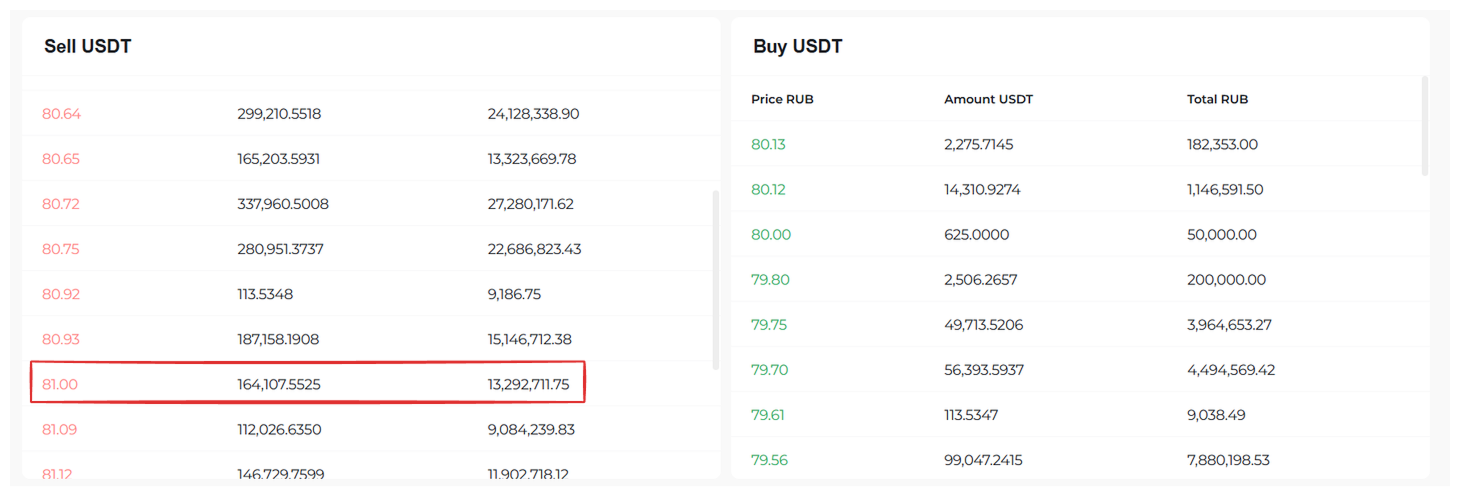
Imagine you would like to sell USDT for rubles at the price of 81 RUB per coin, while the market price is currently 80.13 RUB. You can post a Limit order, setting your preferred price.
Select USDT/RUB from the Pair menu, then set the order form located in the right-hand sidebar to Sell → Limit. Indicate your preferred price by filling in the Limit Price box. Next, indicate the amount you would like to sell, either by entering the USDT amount in the Amount box, or by entering the RUB amount you would like to receive in the Total box. (Once you fill in one of the two boxes, the other one will be filled in automatically based on the Limit Price you set.) You can either type in the necessary amount, or set it as a percentage of your available coins by moving the percentage slider located below the Amount box. Check your trade settings, then press ‘Sell USDT.’
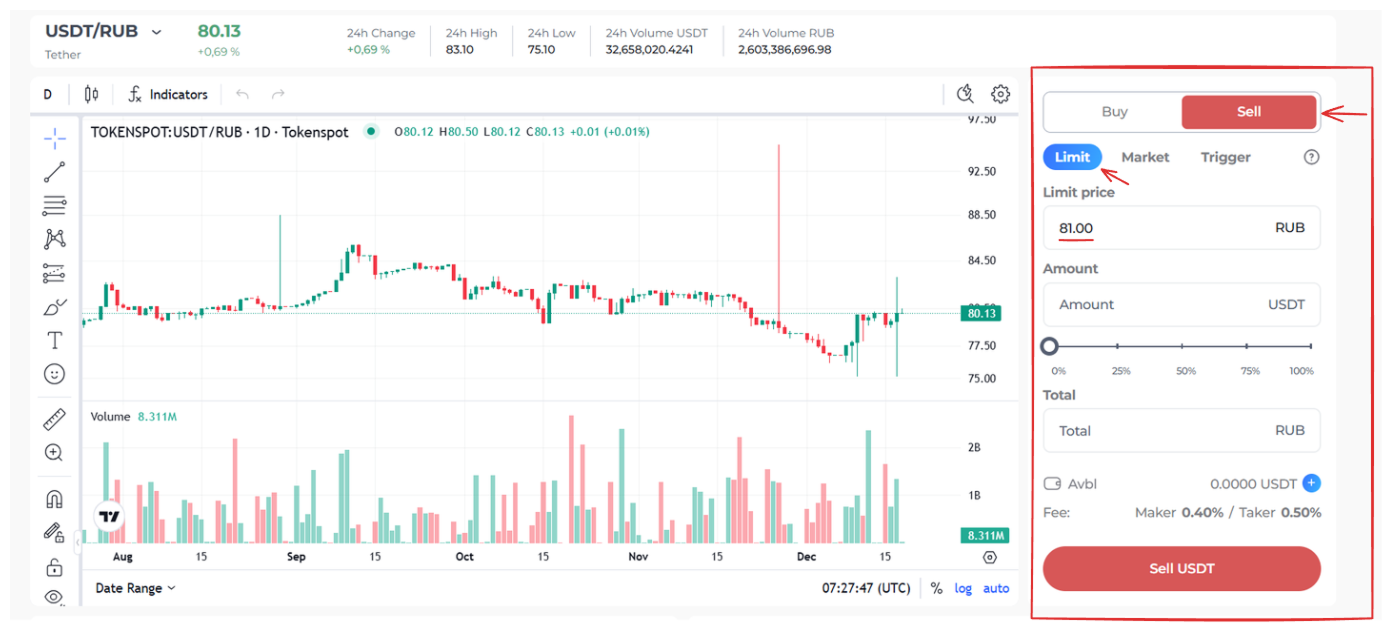
You have now placed your limit order, and it will appear on the relevant order book (See image below).
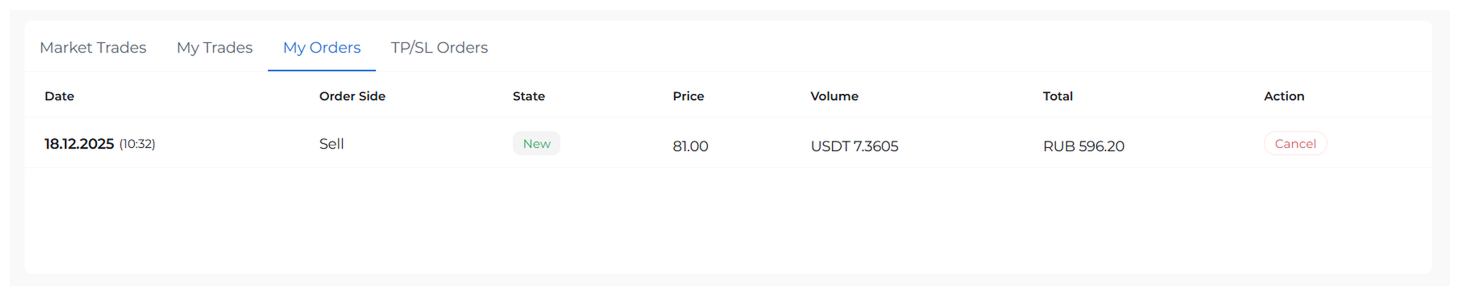
You can view the latest trades on your chosen currency pair in the Market Trades tab located below the order books. You can also manage your open limit orders using the My Orders tab, view your filled orders by going to My Trades, or track your take-profit and stop-loss orders using the TP/SL Orders tab.
Scenario 3 (Trigger-Market Order)
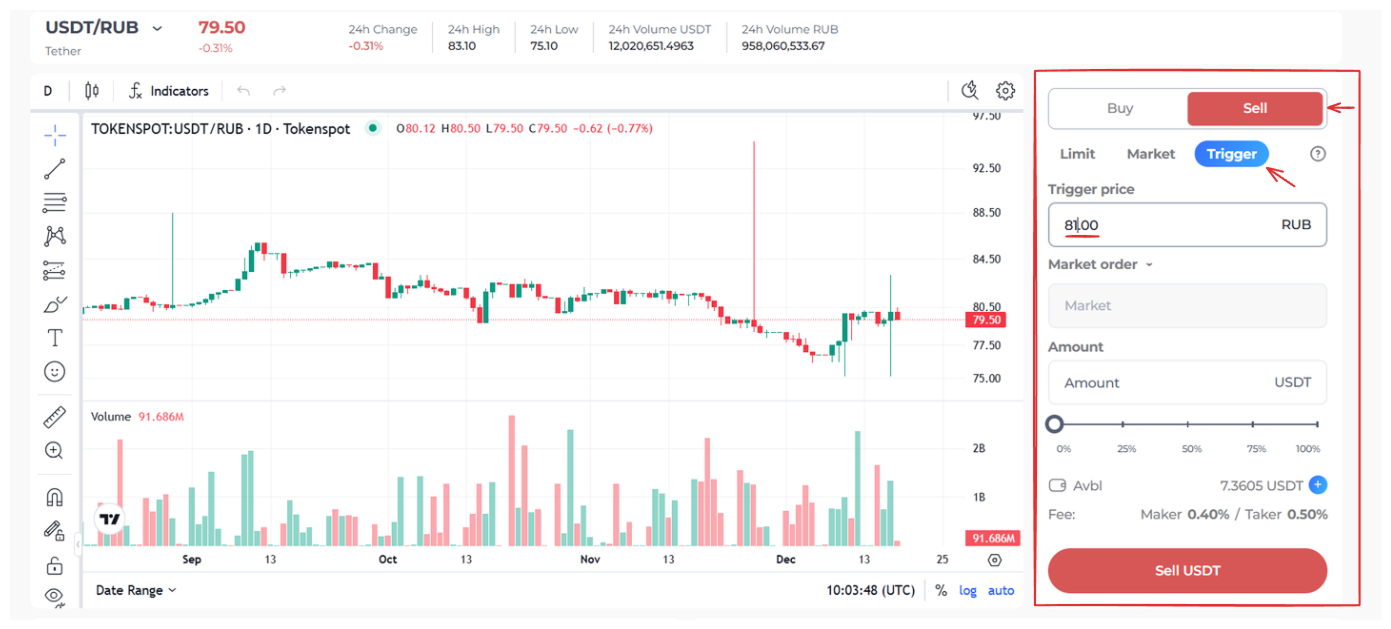
Imagine you would like to sell USDT for rubles at market price once the market rate reaches 81 RUB per coin, realizing that the price will go down past that point. You can create a Trigger-Market order and set your preferred trigger price at 81 RUB.
Select USDT/RUB from the Pair menu, then set the order form located in the right-hand sidebar to Sell → Trigger. Select Market Order from the drop-down menu and fill in the Trigger Price box. Next, indicate the USDT amount you would like to sell. You can either type it in the Amount box, or set it as a percentage of your available coins by moving the percentage slider located below the Amount box. Check your trade settings, then press ‘Sell USDT.’
Once you post this order, it will appear in the TP/SL Orders tab located below the order books.

Scenario 4 (Trigger–Limit Order)
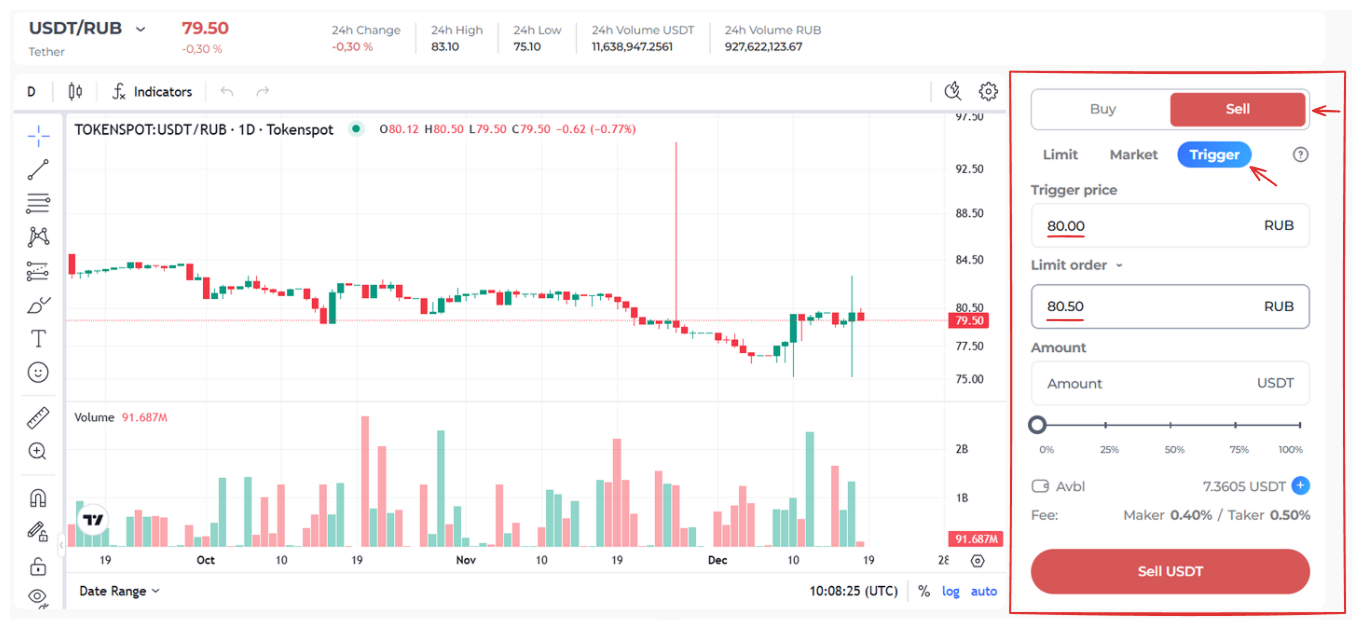
Imagine you would like to sell USDT for rubles at the price of 80.50 RUB per coin, but you don’t want to post a Limit order until the market rate reaches 80.00 RUB, so that your coins wouldn’t get locked on that order in the meantime. You can create a Trigger-Limit order and set your preferred trigger price (80.00 RUB) and your sell price (80.50 RUB).
Select USDT/RUB from the Pair menu, then set the order form located in the right-hand sidebar to Sell → Trigger. Select Limit Order from the drop-down menu and set the trigger price for posting this order by filling in the Trigger Price tab. Indicate your sell price by filling in the box below the drop-down menu. Next, indicate the USDT amount you would like to sell. You can either type it in the Amount box, or set it as a percentage of your available coins by moving the percentage slider located below the Amount box. Check your trade settings, then press ‘Sell USDT.’
Once you submit this order, it will appear in the TP/SL Orders tab located below the order books.

I can’t see my limit order on the relevant order book
Limit orders placed at the same price by different users are displayed as a single limit order on the order book. They are filled by time priority.
How can I keep track of my limit orders?
You can look up your limit orders on the My Orders tab. (You can also use it to cancel a posted order, if necessary.)
A smaller amount of crypto was credited to my wallet compared to the amount I specified for purchase
When you purchase crypto on the spot market, the platform charges a transaction fee, which is deducted from the crypto you’ve purchased. The amount credited to your account is the crypto you’ve purchased minus the fee.
Should you have any questions, feel free to contact our 24/7 Customer Support team using our website chat widget, our Telegram support bot @tokenspot_support_bot, or email [email protected].